

Open3D for Beginners: Installation, Features & Examples

Updated: Aug 13
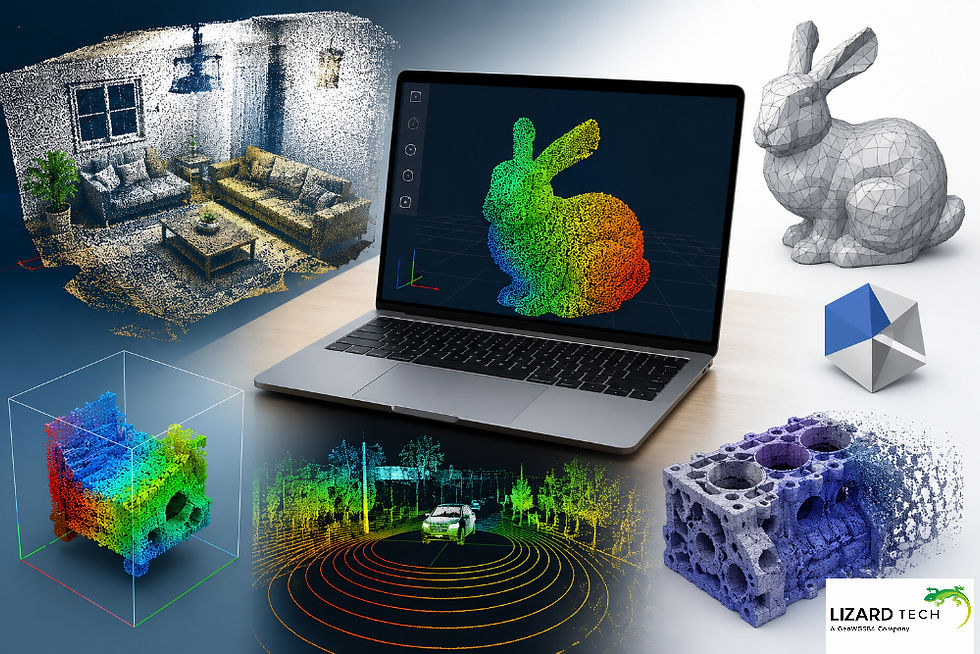
As the fields of 3D computer vision, drones, autonomous systems, augmented/virtual reality (AR/VR), and digital twins continue to expand, there is an increasing need for tools that can effectively process and visualize 3D data. Open3D has grown into one of the most widely used open-source libraries for point clouds, meshes, RBG-D images, and creating 3D reconstruction pipelines.
Whether developing robotics applications as a machine learning engineer or as a researcher in an academic setting, Open3D is an excellent resource for developing highly sophisticated and usable 3D applications.
What Is Open3D?
Open3D is an open-source software library that is primarily intended for working with three-dimensional (3D) data through processing, visualization, and analysis of the 3D data. The APIs are available in both Python and C++, allowing the library to be used for quick prototypes as well as for production-level applications.
Initially, the library was designed to make the creation of 3D software easier in the following areas:
Robotics
Autonomous vehicles
Computer vision
Medical imaging
Inspection within the industrial process
Digital twins
Augmented Reality (AR)
Virtual Reality (VR)
Open3D has optimized implementations available for a variety of operations on 3D data, for example:
Point cloud operations
Surface reconstruction
Mesh operations
See-through registration and alignment
RGB-D image operations
Visualization
Geometrical & Topological analyses of the 3D data
Why Choose Open3D?
The low-level 3D data processing libraries require a lot of complex configurations with very little documentation on how best to use them, which frustrates many programmers.
Open3D addresses these issues with the following features:
Simple-to-use Python API
High-performance C++ engine
Interactive 3D visualization support
Cross-platform support
GPU-accelerated support
Supports integration with popular libraries, including NumPy, PyTorch, and TensorFlow
Active open-source community
Open3D has a good balance between beginner-friendly and complex features.
Installing Open3D
Prerequisites
Before installation, ensure you have:
Python 3.8 or newer
pip package manager
Virtual environment (recommended)
Check your Python version:
python --versionExample:
Python 3.11.5Install Open3D using pip.
The simplest installation method:
pip install open3dVerify installation:
import open3d as o3dprint(o3d.__version__)Expected output:
0.19.0Install Inside a Virtual Environment
Create a virtual environment:
python -m venv open3d-envActivate it:
Windows
open3d-env\Scripts\activatemacOS/Linux
source open3d-env/bin/activateInstall Open3D:
pip install open3dInstall Development Version
For accessing the latest features:
pip install --upgrade open3dOr install from source:
git clone https://github.com/isl-org/Open3D.gitcd Open3Dmkdir buildcd buildcmake ..make -j8sudo make installSupported Data Types in Open3D
Open3D supports several important 3D representations.
Point Clouds
A point cloud consists of millions of XYZ coordinates representing a 3D scene.
Example:
pcd = o3d.io.read_point_cloud("sample.ply")Applications:
LiDAR processing
Mapping
Object detection
Autonomous navigation
Triangle Meshes
Triangle meshes represent surfaces using vertices and faces.
mesh = o3d.io.read_triangle_mesh("model.obj")Used in:
CAD systems
Gaming
AR/VR
Simulation
RGB-D Images
RGB-D combines:
RGB image
Depth image
rgbd = o3d.geometry.RGBDImage.create_from_color_and_depth( color, depth)Common in:
SLAM
Indoor mapping
Robotics
Loading and Visualizing Point Clouds
One of Open3D's most powerful features is real-time visualization.
Load a Point Cloud
import open3d as o3dpcd = o3d.io.read_point_cloud("pointcloud.ply")print(pcd)Output:
PointCloud with 150000 pointsDisplay Point Cloud
o3d.visualization.draw_geometries([pcd])This opens an interactive 3D viewer where users can:
Rotate
Zoom
Pan
Inspect geometry
Point Cloud Processing
Point clouds often contain millions of points and noise.
Open3D provides several optimization techniques.
Downsampling
Reduce point count while preserving shape.
downsampled = pcd.voxel_down_sample( voxel_size=0.05)Benefits:
Faster processing
Reduced memory usage
Improved algorithm performance
Noise Removal
Statistical outlier removal:
clean_pcd, indices = pcd.remove_statistical_outlier( nb_neighbors=20, std_ratio=2.0)Useful for:
LiDAR scans
Depth cameras
Sensor cleanup
Estimate Normals
Normals are required for many geometric algorithms.
pcd.estimate_normals( search_param=o3d.geometry.KDTreeSearchParamHybrid( radius=0.1, max_nn=30 ))Applications:
Surface reconstruction
Registration
Feature extraction
Working with Triangle Meshes
Load Mesh
mesh = o3d.io.read_triangle_mesh( "model.obj")Compute the vertex normals of the
mesh.compute_vertex_normals()Visualize Mesh
o3d.visualization.draw_geometries([mesh])Mesh Statistics
print( len(mesh.vertices), len(mesh.triangles))Output:
125000 250000Surface Reconstruction Example
A common workflow is converting point clouds into meshes.
Poisson Surface Reconstruction
mesh, densities = ( o3d.geometry.TriangleMesh .create_from_point_cloud_poisson( pcd, depth=9 ))This creates a smooth surface representation suitable for:
Reverse engineering
3D printing
Simulation
Point Cloud Registration
Registration aligns multiple scans into a common coordinate system.
This is essential in:
SLAM
Mapping
Digital twins
ICP Registration Example
result = ( o3d.pipelines.registration .registration_icp( source, target, 0.02, np.eye(4), o3d.pipelines.registration .TransformationEstimationPointToPoint() ))print(result.transformation)The algorithm estimates the transformation matrix that best aligns the two point clouds.
Reading and Writing 3D Files
Open3D supports various formats.
Read Point Cloud
pcd = o3d.io.read_point_cloud( "scan.ply")Save Point Cloud
o3d.io.write_point_cloud( "output.ply", pcd)Read Mesh
mesh = o3d.io.read_triangle_mesh( "model.stl")Save Mesh
o3d.io.write_triangle_mesh( "result.obj", mesh)Open3D and Machine Learning
Open3D integrates with modern AI frameworks.
Supported integrations include:
PyTorch
TensorFlow
NumPy
Example:
import torchimport open3d as o3dtensor = o3d.core.Tensor( [[1, 2, 3]], dtype=o3d.core.float32)torch_tensor = tensor.to_dlpack()This enables efficient data transfer between Open3D and deep learning pipelines.
GPU Acceleration in Open3D
Recent Open3D releases provide tensor-based operations that can leverage GPUs.
Example:
device = o3d.core.Device("CUDA:0")Benefits include:
Faster registration
Accelerated nearest-neighbor searches
Improved large-scale processing
For large LiDAR datasets, GPU acceleration can significantly reduce computation time.
Open 3D is one of the most effective and easily accessible libraries for 3D data processing, visualization, and computer vision workflows. Its mixture of an intuitive Python API, a fast backend supported by GPU acceleration, and many advanced geometry processing features makes Open 3D a great option for either new or experienced users.
By mastering several core principles around 3D computer vision (e.g., point cloud processing, mesh manipulation, registration, reconstruction, and visualization), developers will have the foundation for developing complex applications in robotics, autonomous systems, industrial inspection, augmented reality/virtual reality (AR/VR), and machine learning.
If you are just starting your journey into the world of 3D computer vision, Open 3D provides a practical and scalable foundation to support your project(s), no matter whether they range from a simple point cloud display to a sophisticated real-time 3D reconstruction system.
To learn more about Open3D and its geospatial capabilities, click here.
For more information or any questions regarding the LizardTech suite of products, please don't hesitate to contact us at:
Email: info@geowgs84.com
USA (HQ): (720) 702–4849
(A GeoWGS84 Corp Company)


Great to see such a practical guide on Open3D. The step-by-step installation and examples make it approachable for anyone starting with 3D data, and the point cloud visualization and processing features are solid for building real-world applications. Handling large 3D datasets efficiently often requires reliable connectivity and systems. If you're on the go or need a backup connection while working with cloud resources, it might be helpful to check out h2o wireless reviews for feedback on their service. Good network support can make a real difference when you're transferring heavy files or syncing data.