

When & Why to Use MrSID Compression in GIS

Updated: Aug 14
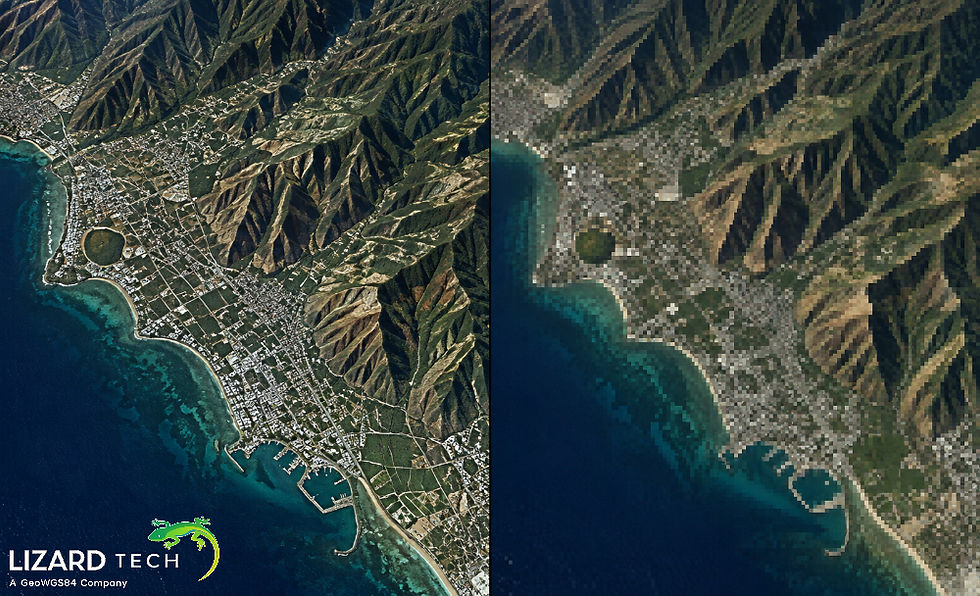
A daily challenge faced by all GIS users is managing large raster geospatial datasets. High-resolution aerial photographs, Satellite Imaging, scanned maps, and Elevation Models can generate tens of terabytes of data quickly, straining storage budgets, network bandwidth, and application performance. This provides GIS users with no alternative but to utilize compression technology; thus, Compression Technology evolved to become a strategic decision.
LizardTech has been developing composite images through the use of the MrSID® (multiresolution seamless image database) compression format for many years. This article will clarify for GIS users when to use MrSID Compression, why to use MrSID Compression, the trade-offs associated with the use of MrSID Compression, and the Decision Criteria that GIS Users may use to select an appropriate compression format for their data processing needs.

What Is MrSID Compression?
MrSID is a wavelet-based raster image compression technology designed specifically for geospatial imagery. Unlike simple image compression formats, MrSID enables:
High compression ratios with excellent visual quality
Fast, partial image access (no need to decompress the entire file)
Built-in multi-resolution pyramids
Seamless handling of extremely large images
MrSID supports both lossy and lossless compression, making it flexible for a wide range of GIS use cases.
When to Use MrSID Compression
Very Large Raster Datasets
If your imagery measures in gigabytes or terabytes—such as statewide aerial imagery or national satellite mosaics—MrSID is an excellent choice. Its wavelet architecture allows users to zoom, pan, and query data efficiently without loading the full dataset into memory.
Typical use cases:
Statewide or national imagery programs
High-resolution orthophotos
Large scanned map archives
Enterprise and Web-Based GIS Distribution
MrSID is optimized for fast data access over networks. Because only the required resolution and spatial subset are transmitted, MrSID significantly reduces bandwidth usage compared to traditional raster formats.
Why it matters:
Faster map services
Improved user experience
Reduced server load
Long-Term Data Storage and Archiving
For organizations maintaining large imagery archives, storage efficiency is critical. MrSID can reduce storage requirements by 10:1 to 50:1 (or more, depending on data and settings) while preserving visual fidelity.
Lossless MrSID is particularly valuable when exact pixel values must be retained for future analysis.
Multi-Scale Visualization Workflows
MrSID automatically stores multiple resolutions in a single file. This eliminates the need to manage external pyramid files and ensures smooth performance from overview to full resolution.
Ideal for:
Desktop GIS visualization
Interactive map applications
Field-based GIS access
Why Choose MrSID Over Other Raster Formats?
MrSID vs. GeoTIFF
GeoTIFF is widely supported and simple, but it can become inefficient at large scales.
Feature | MrSID | GeoTIFF |
Compression efficiency | High | Moderate |
Multi-resolution | Built-in | External pyramids |
Large image handling | Excellent | Limited |
Network performance | Optimized | Slower |
Understanding the Tradeoffs
Lossy vs. Lossless Compression
Tradeoff: Higher compression reduces file size but may slightly alter pixel values in lossy mode.
Analytical Accuracy
Lossy compression on MrSID files may appear to be visually lossless for day-to-day use, but may not be best for pixel-level scientific analysis. Lossless compression or uncompressed formats should be used when doing pixel-level scientific analysis.
Software Support
MrSID has great software support on most major GIS platforms; however, not all lightweight and open-source tools have MrSID native support. Therefore, examine your complete software ecosystem prior to standardizing on a specific format.
Decision Criteria for GIS Professionals
Ask yourself these questions when considering MrSID Compression:
How big is your dataset? MrSID Compression Has Greatest Benefits With Larger Datasets
Is your primary use to visualize or analyze? Visualizing Data (Metadata) With Lossey MrSID, Use Lossless When Analyzing
Do you Need Multi-resolution Performance? Built-In Pyramids Of Data Simplify Workflows Of Operations When Preparing For Multi-Resolution Display
What Are Your Future Data Storage Costs? Increased Compression Results In A Significant Decrease In Infrastructure Expense.
Best Practices for Using MrSID
Compression ratio selection (basemap will have higher compression ratio values than detailed views).
Visual potential checking before completing import for larger jobs.
Preserve originating data for critical assessment.
Uniform compression settings for all projects.
MrSID offers an effective method to control multiple sizes of imagery (referred to as raster) from a single project with optimal performance, high-quality image output, and while still being reasonably cost-effective. The variety of performance options MrSID provides has created an opportunity for industries to begin utilizing MrSID in order to improve overall system efficiency by maximizing available resources within their own business architecture with respect to imagers.
MrSID still remains an ideal and continuing solution for the management of large amounts of imagery that need efficient storage options, easy access, and very scalable possibilities for multiple uses by different users and departments.
For more information or any questions regarding the LizardTech suite of products, please don't hesitate to contact us at:
Email: info@geowgs84.com
USA (HQ): (720) 702–4849
(A GeoWGS84 Corp Company)


Comments