

How to Compress Satellite Imagery in GeoExpress

Updated: Apr 23
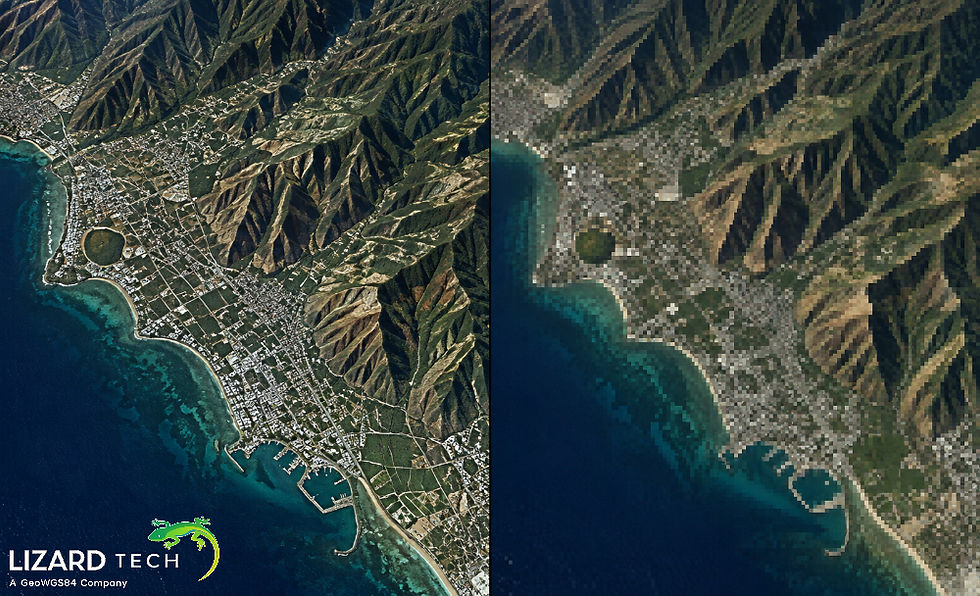
Satellite imagery files are growing larger every year, driven by higher spatial resolution, more spectral bands, and frequent revisit rates. Efficient image compression is crucial for organizations that require storing, distributing, and analyzing large volumes of geospatial data. GeoExpress®, developed by LizardTech, is a powerful solution for compressing satellite imagery while preserving data quality and performance.
In this guide, we’ll walk through how to compress satellite imagery in GeoExpress, explain best practices, and highlight why MrSID® and JPEG 2000 workflows remain industry standards.

Why Compress Satellite Imagery?
Before diving into the workflow, it’s important to understand why compression matters:
Reduced storage costs by shrinking large raster datasets
Faster data access and streaming over networks
Improved performance in GIS and remote sensing applications
Preserved image quality for analysis and visualization
GeoExpress supports both lossless and lossy compression, enabling users to balance image fidelity and file size according to project requirements.
Supported Satellite Imagery Formats in GeoExpress
GeoExpress can take in and compress all types, as long as they are already images, as well as all formats of satellite imagery. This includes the following:
TIFF (Geospatial Tag Image Format)
NITF (National Imagery Transmission Format)
IMG or ERDAS Imagine
BIL/BIP/BSQ (Band Interleaved by Line/Pixel/Scanline)
Other Raster Formats (with geolocations)
GeoExpress’ compressed imagery outputs are typically produced in MrSID 4 (MG4) and JPEG 2000 (JP2). Both formats support geospatial workflows on very large image collections.
Step-by-Step: How to Compress Satellite
Imagery in GeoExpress
Launch GeoExpress
Open GeoExpress on your system. Ensure you are using the latest version to take advantage of improved compression efficiency and performance enhancements.
Add Satellite Imagery Files
Click Add Files or Add Folder
Select one or multiple satellite imagery files
GeoExpress supports batch processing, making it ideal for large imagery collections.
Choose the Output Format
Select your desired output format:
MrSID (MG4) – Ideal for fast access, streaming, and broad GIS compatibility
JPEG 2000 – An open standard commonly used in enterprise and defense environments
For most geospatial users, MrSID Generation 4 offers the best balance of speed, compression, and usability.
Configure Compression Settings
This is the most critical step in the process.
Lossless Compression
Preserves every pixel value exactly
Recommended for scientific analysis and archival data
Produces larger files than lossy compression
Lossy Compression
Reduces file size significantly with minimal visual impact
Ideal for visualization, web delivery, and rapid access
Compression ratios such as 10:1, 20:1, or higher can be selected
GeoExpress provides real-time previews and estimated file sizes to help you choose the right settings.
5. Set Advanced Options (Optional)
Depending on your workflow, you may also configure:
Tiling and resolution levels for faster zoom and pan
Metadata preservation (georeferencing, coordinate systems, and tags)
Multispectral band handling for satellite sensors
NITF options for defense and intelligence workflows
These options ensure the compressed output integrates seamlessly into existing GIS systems.
Select Output Location
Choose a destination folder for the compressed imagery. You can also define naming conventions for batch jobs to maintain consistent file organization.
Start Compression
Click Start to begin the compression process. GeoExpress efficiently uses system resources to process large datasets quickly, even when working with terabytes of satellite imagery.
Best Practices for Compressing Satellite Imagery
Use a lossless compression method for analytical and regulatory data.
Use lossy compression methods for basemap and visualization layers.
Test various compression ratios to obtain the optimal balance.
Maintain the source imagery for long-term archiving purposes.
Process large datasets in batches to save time and ensure consistency.
Why GeoExpress is the Best Software for Compressing Satellite Data?
The GeoExpress software has been used and trusted by Government Agencies, Commercial Satellite Providers, and GIS Professionals around the world because it provides:
The only verified MrSID and JPEG 2000 compression technology.
The best processing ability for handling enormous raster datasets.
The ability to integrate seamlessly into Esri and other GIS software applications.
Provides an efficient way to maintain the integrity of metadata and geospatial accuracy.
Learning to compress satellite imagery using GeoExpress is a necessary skill to manage today’s vast amounts of geospatial data. The process outlined above can help you significantly reduce file size, increase the speed of data delivery, and maintain the quality standard that is required for professional GIS and remote sensing applications.
For more information or any questions regarding the LizardTech suite of products, please don't hesitate to contact us at:
Email: info@geowgs84.com
USA (HQ): (720) 702–4849
(A GeoWGS84 Corp Company)

Comments