

GeoExpress: High-Performance Geospatial Image Compression

Updated: Aug 13
High-resolution geospatial imagery is the backbone of modern GIS, remote sensing, defense intelligence, and mapping applications. However, the massive size of raw raster datasets—often tens or hundreds of gigabytes—creates significant challenges for storage, distribution, and real-time visualization.
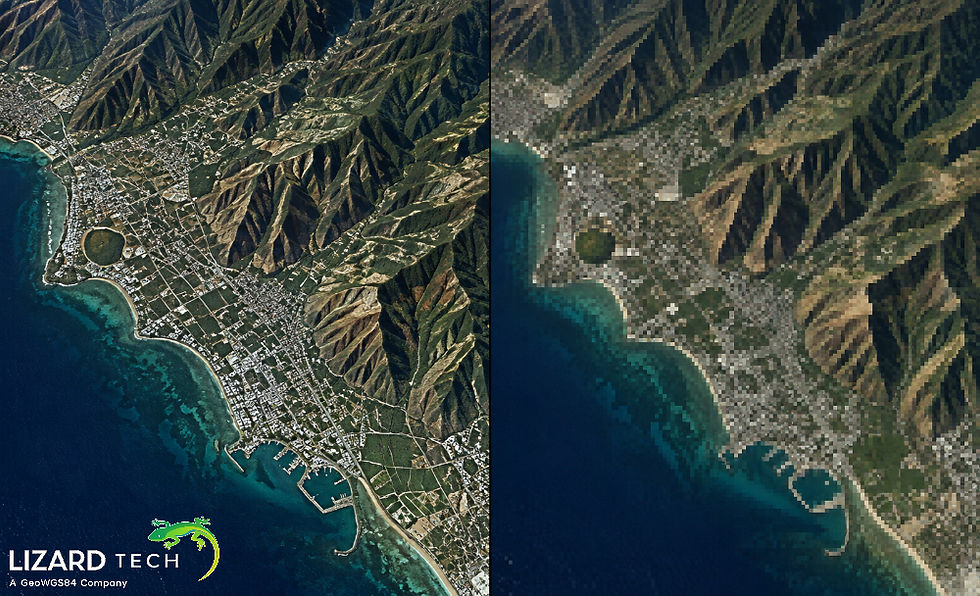
GeoExpress, developed by LizardTech, is one of the most powerful tools for compressing and optimizing geospatial imagery while preserving visual fidelity and geospatial integrity. By leveraging the MrSID® compression format, GeoExpress enables organizations to dramatically reduce raster file sizes without compromising usability.
This technical guide explores how GeoExpress works, why it is widely used in geospatial workflows, and how to implement high-performance compression pipelines using it.

Understanding the Challenge of Geospatial Image Data
Raster datasets that are georeferenced come from a variety of sources, including but not limited to:
LiDAR (Light Detection and Ranging) derived raster products.
Historical maps that have been scanned
Common unprocessed formats for imagery include:
GeoTIFF
NITF (National Imagery Transmission Format)
JPEG2000
Raster data sets in RAW format.
For instance, an uncompressed GeoTIFF image of an entire metropolitan area may exceed 20-50 GB in size. Because of this, an uncompressed image can be extremely difficult to:
Store efficiently
Move over networks
Distribute via web mapping services.
Utilize in a GIS software program.
Thus, GeoExpress becomes a very important tool.
What is GeoExpress?
GeoExpress is a professional software application for compressing and manipulating geospatial images, including but not limited to the following services:
Compress raster datasets to very efficient formats.
Maintain geospatial metadata
Stream images at any level of scalability
Increase GIS and remote sensing application performance.
The two primary formats that GeoExpress works with are:
MrSID Generation 4 (MG4)
JPEG2000
Both formats support lossy and lossless compression techniques, which allow users to achieve an optimal combination of file size versus image quality.
Why GeoExpress is Critical for Geospatial Workflows
Massive Storage Reduction
GeoExpress can compress raster imagery at ratios ranging from 10:1 to over 50:1, depending on the dataset and compression settings.
Example:
Format | File Size |
Raw GeoTIFF | 40 GB |
MrSID (20:1 compression) | 2 GB |
This reduction dramatically lowers infrastructure costs.
Multi-Resolution Image Access
MrSID and JPEG2000 use wavelet compression, which stores imagery in multiple resolution levels.
This allows applications to:
Load only the resolution needed.
Display imagery instantly
Avoid loading entire datasets into memory.
This is critical for web mapping systems and enterprise GIS platforms.
Faster Image Streaming
Compressed imagery enables efficient streaming through services such as:
WMS (Web Map Service)
WMTS
Image server platforms
Instead of transferring gigabytes of imagery, systems can stream only the required portions.
Supported Formats in GeoExpress
Geospatially related workflows are supported with GeoExpress in both format types, i.e. input formats and output formats.
Input Format Types
Samples of typical input formats are as follows:
GeoTIFF
TIFF
NITF
JPEG
PNG
JPEG2000
Output Format Types
GeoExpress supports export to the following formats:
MrSID (MG2 / MG3 / MG4)
JPEG2000
NITF
GeoTIFF
By supporting multiple formats, GeoExpress can ensure smooth integration into any geospatial workflow.
Step-by-Step Workflow: Compressing Imagery with GeoExpress
Step 1: Import the Raster Dataset
Launch GeoExpress and open your raster dataset:
File → Open → Select GeoTIFF or other raster file.GeoExpress automatically reads:
Projection information
Georeferencing metadata
Band structure
Step 2: Configure Compression Settings
Navigate to:
Tools → EncodeKey parameters to configure:
Output format (MrSID or JPEG2000)
Compression ratio
Tiling
Multi-resolution levels
Color space
Recommended settings for aerial imagery:
Setting | Recommended Value |
Format | MrSID MG4 |
Compression Ratio | 20:1 |
Tiles | 1024 |
Color Space | RGB |
Step 3: Enable Multi-Threaded Processing
GeoExpress supports parallel encoding, which significantly accelerates processing for large datasets.
Enable:
Preferences → Processing → Multi-ThreadingFor high-performance workstations:
Allocate 80–90% of CPU cores.
Step 4: Execute Compression
Start the encoding process.
GeoExpress performs:
Wavelet transformation
Data quantization
Progressive image encoding
Metadata embed.ding
Processing time depends on:
Image size
Compression ratio
CPU cores
Disk throughput
Future of Geospatial Image Compression
As satellite-building constellations and drone platforms generate more and more volumes of imagery, compression technology will continue to become increasingly important.
The following are some emerging trends:
Cloud-optimized imagery formats
AI-assisted compression
Real-time high-performance geoStream
Edge processing of satellite images
GeoExpress continues to serve as a solid tool to manage large numbers of geospatial raster data sets.
To manage large volumes of geospatial raster datasets efficiently, you need powerful compression technologies to maintain both the quality and spatial accuracy of your images.
GeoExpress provides an effective and powerful solution for:
Efficient and high-performance compression of geospatial images
Multi-resolution streaming of geospatial images
Efficiently storing and distributing large volume imagery data sets.
Using formats such as MrSID and JPEG 2000 (and more), organizations can save on storage space, accelerate their data delivery timeframes, and deliver better performance in their GIS and remote sensing applications.
For organizations performing aerial/satellite imaging, implementing GeoExpress compression workflows is essential to the development of scalable, high-performance, geospatial infrastructures.
For more information or any questions regarding the LizardTech suite of products, please don't hesitate to contact us at:
Email: info@geowgs84.com
USA (HQ): (720) 702–4849
(A GeoWGS84 Corp Company)

Comments