

Lossless vs Lossy Compression: What Should You Choose?

Updated: Aug 3
Digital data is being used more and more often, most prominently in large volumes of digital, high-resolution imagery; therefore, image compression is a vital process within many fields, including, but not limited to, remote sensing, medical imaging, multimedia, and other forms of digital imagery processing. Thus, the impact of the system performance, operational costs, and overall efficiency will be determined to a large degree by the image compression method selected for use and the quality of the resulting compressed images that will be stored or transmitted through the systems and networks.

What Is Data Compression?
Reducing a file’s physical size through compression involves reorganizing its data so it occupies less storage space. This process helps store data more efficiently, allows it to be retrieved faster from storage devices, and can improve application performance while maintaining usability.
There are two primary categories of compression techniques:
Lossless compression – all original data is included.
Lossy compression – some of the original data is removed to create a greater compression ratio.
When the accuracy of the data or the integrity is important, understanding these two types of compression will be very important!
Lossless Compression Explained
Lossless compression can make files smaller, and still allow for complete and accurate retrieval of original data — this means that there’s no loss of information through this type of compression.
Advantages of Lossless Compression
Full original data integrity
Can reverse compression
Not as much compression ratio as lossy compression
Is an excellent choice for data analysis, and data that will be archived
Examples of Use
GIS images and research in the field of geospatial data
Medical or technical imaging
Data that must comply with legal requirements
Archival storage
Lossless compression is the benchmark for a type of compression in industries where data accuracy is critical.
Lossy Compression Explained
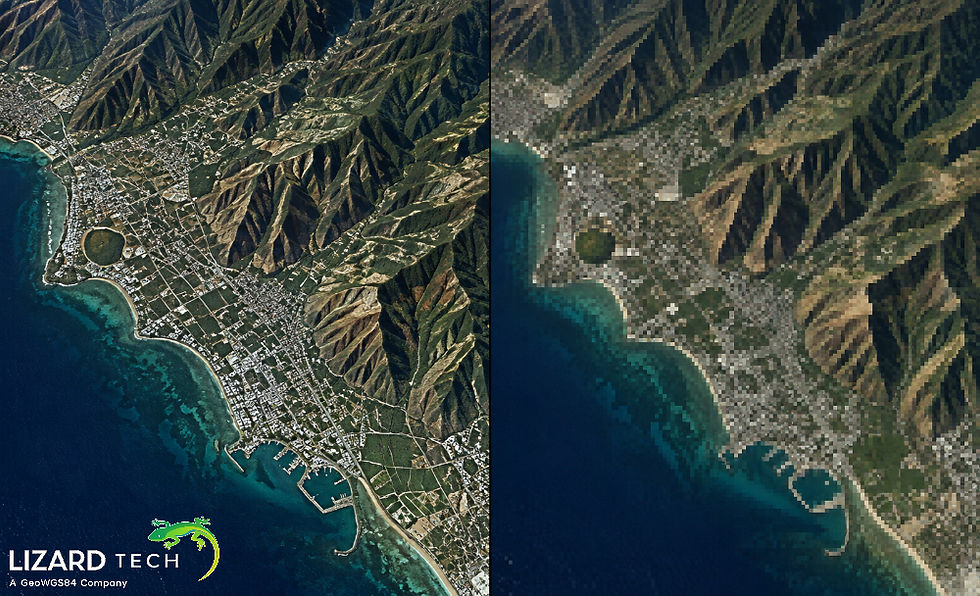
Lossy compression reduces file size significantly by permanently discarding data that is considered less important, often eliminating details that are not easily noticeable to the human eye.
Key Characteristics of Lossy Compression
Some data loss is expected.
Irreversible compression
Much higher compression ratios
Optimized for visualization and distribution
Common Use Cases
Web and mobile imagery
Streaming media
Rapid image delivery
Visualization-focused applications
When performance, speed, and storage efficiency matter more than pixel‑perfect accuracy, lossy compression is often the best choice.
Lossless vs Lossy Compression: Side-by-Side Comparison
Feature | Lossless Compression | Lossy Compression |
Data Integrity | Fully preserved | Partially discarded |
File Size Reduction | Moderate | High |
Reversible | Yes | No |
Best For | Analysis, archiving | Visualization, distribution |
Choosing the Right Compression for Geospatial Imagery
Due to different aspects of both their size and resolution, along with how they are processed or analyzed, using geospatial imagery has unique challenges; thus, the method chosen to use the geospatial data will determine which compression method will be used.
Imagery that supports measurement, classification, and/or regulatory decisions should be compressed in a lossless format.
Imagery whose primary usage is for visualization, mapping, and/or fast access should be compressed using a lossy method.
Many organizations utilize a mixed use of compression, keeping lossless versions of all of their data, along with providing lossy versions of the data for their day-to-day activities.
MrSID: Optimized for High-Performance Imagery
LizardTech has developed an industry-standard compression format for large raster images, called MrSID (Multipurpose & Scalable Image Data).
Advantages of MrSID:
Provides both lossy and lossless compression.
Provides fast access to large images.
Maintains geospatial accuracy.
Suitable for aerial, satellite, and raster GIS Data.
MrSID lets you balance the quality of images vs. the size of files for your project needs without losing performance.
GeoExpress: Powerful Compression Made Simple
GeoExpress is the desktop program offered by LizardTech to compress (and decompress) spatial images.
Benefits of using GeoExpress:
Compression using lossless or lossy for creating MrSID files.
Ability to control the quality and ratio of compression.
Optimization of images for storage, streaming, and/or distribution.
Fidelity of spatial accuracy and metadata integrity.
Using GeoExpress allows organizations to greatly reduce costs associated with storing images and maintain data to meet their requirements.
There is no one‑size‑fits‑all answer to the lossless vs lossy compression debate. The right choice depends on your workflow, data sensitivity, and performance needs.
With tools like MrSID and GeoExpress, LizardTech empowers organizations to make the right compression choice—without compromise.
For more information or any questions regarding the LizardTech suite of products, please don't hesitate to contact us at:
Email: info@geowgs84.com
USA (HQ): (720) 702–4849
(A GeoWGS84 Corp Company)


Comments