

LiDAR Data Compression: Reduce File Size Without Quality Loss

Updated: Aug 13
LiDAR (Light Detection and Ranging) technology is widely utilized through very different industries, including geospatial mapping, forestry, urban planning, and autonomy. As LiDAR sensors have improved in accuracy and sophistication over time, they have produced increasingly large quantities of data—single LiDAR projects can generate multiple terabytes of data.
Effectively managing, storing, and sharing the enormous volume of data present in a LiDAR project can be very challenging. That’s where LiDAR data compression comes into play.

What Causes LiDAR Data to Be So Large
A typical LiDAR dataset contains millions, and in some cases, billions of points. Each point will generally contain the following attributes:
X, Y, & Z Coordinate
Intensity Value (i.e., strength of return signal)
Return Number
Classification Information (i.e., "ground," "building," "tree," etc.)
RGB Color (in some cases)
Raw LiDAR data (i.e., LAS files) tend to be very large due to the amount of information contained within them.
For example, a 100 sq. km. survey will commonly generate raw LiDAR files that contain approximately 50-500 GB of data.
What Is LiDAR Compression?
LiDAR compression reduces file size while preserving as much of the original information as possible. There are two main types:
No data is lost
Original data can be perfectly reconstructed.
Ideal for archival and analysis
Some data is simplified or removed.
Much higher compression ratios
Suitable for visualization and web delivery
The key is choosing the right balance between file size and fidelity.
Benefits of Compressing LiDAR Data
Reduced storage costs
Faster data transfer and sharing
Improved performance in GIS and visualization tools
Better scalability for cloud workflows
Popular LiDAR Compression Formats
Below are the most widely used LiDAR formats, including both open standards and advanced proprietary solutions.
Multi-resolution Seamless Image Database - MrSID
Best To Use: Visualization With High Throughput & Workflows That Can Be Scaled
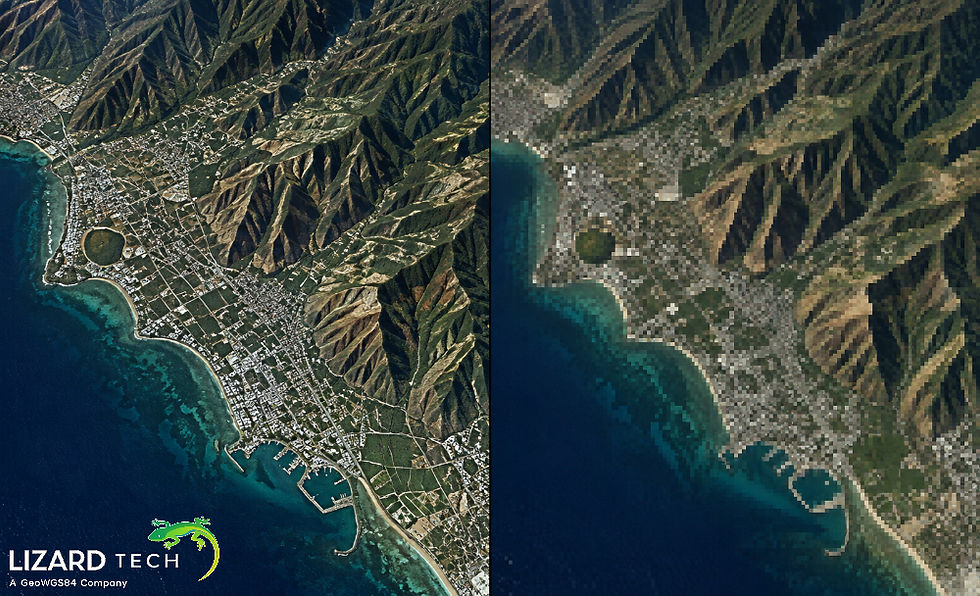
MrSID is a very high-quality compression format that was created to accommodate the growing size of large geospatial data, which includes LiDAR data.
Key Features:
Very High Compression Ratio With Minimal Loss In Quality
Supports Fast Zooming And Panning With A Multi-Resolution Architecture
Designed To Be Efficient For Both Streaming And Cloud Based Delivery
Designed To Allow For The Effective Visualization Of Huge Data Sets
Why Use MrSID For Storing And Streaming LiDAR Data?
MrSID Allows Users To Efficiently Store And Stream Massive Point Cloud Data Making It The Optimal Format For Enterprise Level Geospatial Applications
Compressed LAS (LAZ)
Best To Use: Lossless Compression And Interoperability
LAZ Format (LAZ) Is A Compressed Version Of The LAS Format That Is Widely Used In The Geospatial Community.
Key Features:
Compression With No Data Loss (Lossless)
Typically Reduces The Size Of Files By 70–90 Percent
Open Format That Attracts Many Development Community Tools
Limitations:
Not Designed For Streaming Very Large Data Sets
Accessing Compressed Data Is Slower Than Multi-Resolution Formats
Entwine Point Tile (EPT)
Best To Use: Cloud-Based and Web-Based Workflow
EPT (Entwine Point Tile) Provides Access To LiDAR Data Organized In A Multi-Level Hierarchical Way That Increases Access Speed.
Key Features:
Designed For Storage In The Cloud (AWS & Azure)
Supports Streaming Data And Loading Only Portions
Compatible With Many Web Visualization Tools
COPC (Cloud Optimized Point Cloud)
When to use it: When you need to get data from the cloud easily, but use the LAS format to do this.
The COPC format is a new way of representing a point cloud that uses a combination of LAS/LAZ data in a method that makes it possible to optimize for use in the cloud.
Key Features:
Spatial indexing to allow for quick searches
Compatible with all existing LAS/LAZ workflows
Optimized for range request via HTTP
Draco (developed by Google)
When to use it: When you need to visualize data in a web application or use 3D files in web/mobile applications
Draco is a way to compress and create 3D models/geometry, including point clouds.
Key Features:
Very high compression ratios
Ideal for displaying 3D data in a browser
Commonly used with 3D tiles and mobile/web applications.
Limitations:
Not recommended for analytical workflows
May result in loss of geometry data
Best Practices for LiDAR Compression
To decrease the amount of storage space taken up by your files while still keeping them high-quality, follow these best practices:
Select the Best Compression Format
Use LAZ for archival and accuracy (because it's a lossless format).
Use MrSID (Multi-Resolution Seamless Image Database) for visualization and enterprise delivery.
Use EPT (Entwine Point Tile) and COPC (Cloud Optimized Point Cloud) for workflows based in the cloud.
Optimize Point Density
Remove redundant and unnecessary points from the point cloud dataset.
Use thinning techniques when appropriate.
Leverage Tiling and Indexing
Break larger datasets into smaller tiles to make them easier to work with.
Improve the speed of access and performance of the compressed data.
Use Multi-Resolution Formats
Enable fast zooming by using multi-resolution formats.
Enable progressive loading of the data as it is displayed.
Multi-resolution formats are critical for web and mobile applications.
Validate Quality of Your Data
Always verify the accuracy of the data after compression and before use.
Ensure all classifications and metadata stay the same.
When to Use MrSID for LiDAR
You should consider MrSID when:
Streaming large amounts of LiDAR data is the desired workflow.
Want to use interactive visualization as part of your workflow.
Want to drastically reduce the size (costs) of storing large sets of LiDAR data.
Plan to deploy enterprise-level geospatial solutions and systems.
LiDAR data compression is no longer optional—it’s essential for managing modern geospatial workflows. By choosing the right format, you can dramatically reduce file size while preserving the accuracy and usability of your data.
While formats like LAZ and COPC are excellent for lossless storage and cloud access, MrSID stands out for its ability to deliver high-performance visualization and scalable data access.
If your goal is to balance compression, speed, and usability, combining multiple formats—especially with MrSID—can provide the most efficient and flexible solution.
For more information or any questions regarding the LizardTech suite of products, please don't hesitate to contact us at:
Email: info@geowgs84.com
USA (HQ): (720) 702–4849
(A GeoWGS84 Corp Company)


Comments